I put Vanta's permissions in a Rust kernel the model cannot change.
Vanta is an open-source local AI operator for files, research, automation, and messaging. A separate Rust kernel checks every action before it runs. I wrote the mandate, designed the product and brand, built both layers, and shipped a notarized macOS release.
- Role
- Solo, mandate, brand, product, and engineering
- Architecture
- Rust safety kernel + TypeScript agent + Electron desktop
- Shipped
- Desktop v0.9.5 notarized, v0.9.8 current
- License
- MIT, local-first, provider-agnostic
The project started with a correction.
On 2 June 2026 I set out to build a local agent. The coding agent drifted and built a website instead. I told it plainly: that is not what I asked for. The correction led to the Rust runtime, the goal ledger, and the first PRD. That moment also became line eight in the manifesto: ship, do not drift.
Capability is shipping faster than control.
Agents can now reach files, shells, browsers, messages, and money. Most safety rules still live in a prompt the same model is expected to obey. I did not want the model policing itself. The boundary had to sit somewhere the model could not reach.
- 01An agent with tool access can delete, send, or spend before a human ever sees the action.
- 02Prompt-level guardrails let the model propose an action and decide whether it is allowed.
- 03A warning is not a boundary. The system needs to stop the action before it runs.
- 04No durable record of what was proposed, what a human approved, and what actually ran.
- 05Cloud agents send context off-device. I wanted the operator and its record to stay local.
Start with the problem, not the finished interface.
I started with the desktop problem, then worked down through the sitemap, user flows, wireframes, and the Rust boundary underneath them.
The evidence is the current repository, renderer and route code, isolated Electron launches, screenshots, smoke scripts, and regression checks. No user study is claimed. Sitemaps, flows, SWOT, and low-fidelity frames are analytical reconstructions from that record.
Problem, users, team, and method
How might a local AI operator keep one useful work loop visible while making tool use, approvals, failure, and recovery understandable at every step?
- 01Audit
- 02Define
- 03Map
- 04Wireframe
- 05Build
- 06Verify
Work, setup, outputs, sessions, and inspection competed for equal attention. The operator had capability, but not one stable mental model for starting, supervising, and recovering a task.
Reduce the desktop to one work loop: start or resume, watch the run, decide on risky steps, inspect the result, and configure capability only when needed.
Solo product, UX, brand, and engineering. Jason Poindexter owned the mandate, structure, interaction model, implementation, and release evidence.
Primary: a focused local operator doing work across tools and files. Oversight role: the same person reviewing consequential actions, receipts, and recovery choices. These are task roles, not interview personas.
Code and route audit, isolated Electron launch, screenshot review, source and packaged-app flow smokes, responsive layout checks, and a blind interface audit.
Local-first, provider-agnostic, one stable desktop shell, a separate Rust enforcement boundary, and no UI shortcut that weakens approval or audit behavior.
What the evidence says is broken
The source desktop could fail before the work surface rendered.
- Evidence
- Theme state was referenced outside its owner and the normal TypeScript command did not include the Electron renderer.
- Design response
- Pass theme state into the overlay boundary, add a renderer-specific typecheck, and fail native smoke on renderer errors or a missing shell.
Several competing shells obscured the main task.
- Evidence
- Top-level modes, session navigation, header utilities, and inspector tabs all demanded equal weight before a task began.
- Design response
- Keep three destinations, Work, Outputs, and Connect. Move sessions inside Work and open the inspector only from a related action.
Failure recovery was too global and too generic.
- Evidence
- One failed dependency could replace the entire desktop, while an execution error appeared as if it were an assistant response.
- Design response
- Keep the shell and draft visible, scope the failure to the affected surface, preserve partial output, and retry the failed step.
Project files read as a raw inventory instead of usable context.
- Evidence
- The file rail could expose hundreds of paths without grouping, search, or a selected-context state.
- Design response
- Move file selection into the composer, group by recent and task relevance, and show removable context chips before send.
Session management lacked safe feedback and recovery.
- Evidence
- Archive and delete behavior depended on immediate confirmation without a durable trash path or undo feedback.
- Design response
- Archive immediately with Undo, move delete to recoverable trash, and expose pending, success, and error states.
Model scope and agent context were hard to inspect.
- Evidence
- Files, tools, memory, model scope, and permissions were mostly invisible until another panel opened.
- Design response
- Place model and context in the work header and composer. Render tool and approval evidence in the same run stream.
The contextual rail consumed space even when it had no job.
- Evidence
- The desktop could open as a three-pane layout with an empty Canvas rail, then change shells on another destination.
- Design response
- Default to task rail plus work surface. Open Preview, Files, Canvas, or Terminal only when the current task creates that context.
Status reports the July 2026 audit record. Proposed work is not presented as shipped.
SWOT reconstructed from the project record
Strengths
Internal / helpful- A separate Rust process owns risk, approvals, goals, and audit events.
- The desktop exposes current goal, tool activity, approvals, outputs, and receipts.
- The TypeScript agent and desktop can change without moving the enforcement boundary.
Weaknesses
Internal / harmful- A solo-built system concentrates product, security, and validation decisions.
- Several surfaces must explain one run without creating duplicate state.
- Provider and tool differences increase setup and recovery complexity.
Opportunities
External / helpful- Local operators need inspectable control as agents gain access to real tools.
- Receipts and reusable runs can turn one-off automation into accountable work.
- A stable kernel can support new interfaces without weakening the boundary.
Threats
External / harmful- Provider behavior and tool protocols change outside the product.
- A reassuring interface can overstate what the kernel actually intercepts.
- Complex setup can stop users before the supervision model becomes useful.
One work loop, with the kernel visible inside it.
The desktop audit found too many shells and top-level modes. I cut the product down to one operator loop: start or resume a task, watch the work, stop at risky steps, and review the result. Configuration stays out of the way until it is needed. The kernel remains a separate process, but its state is always visible.
The decisions that set the boundary.
I put the boundary in a separate Rust kernel, outside the model.
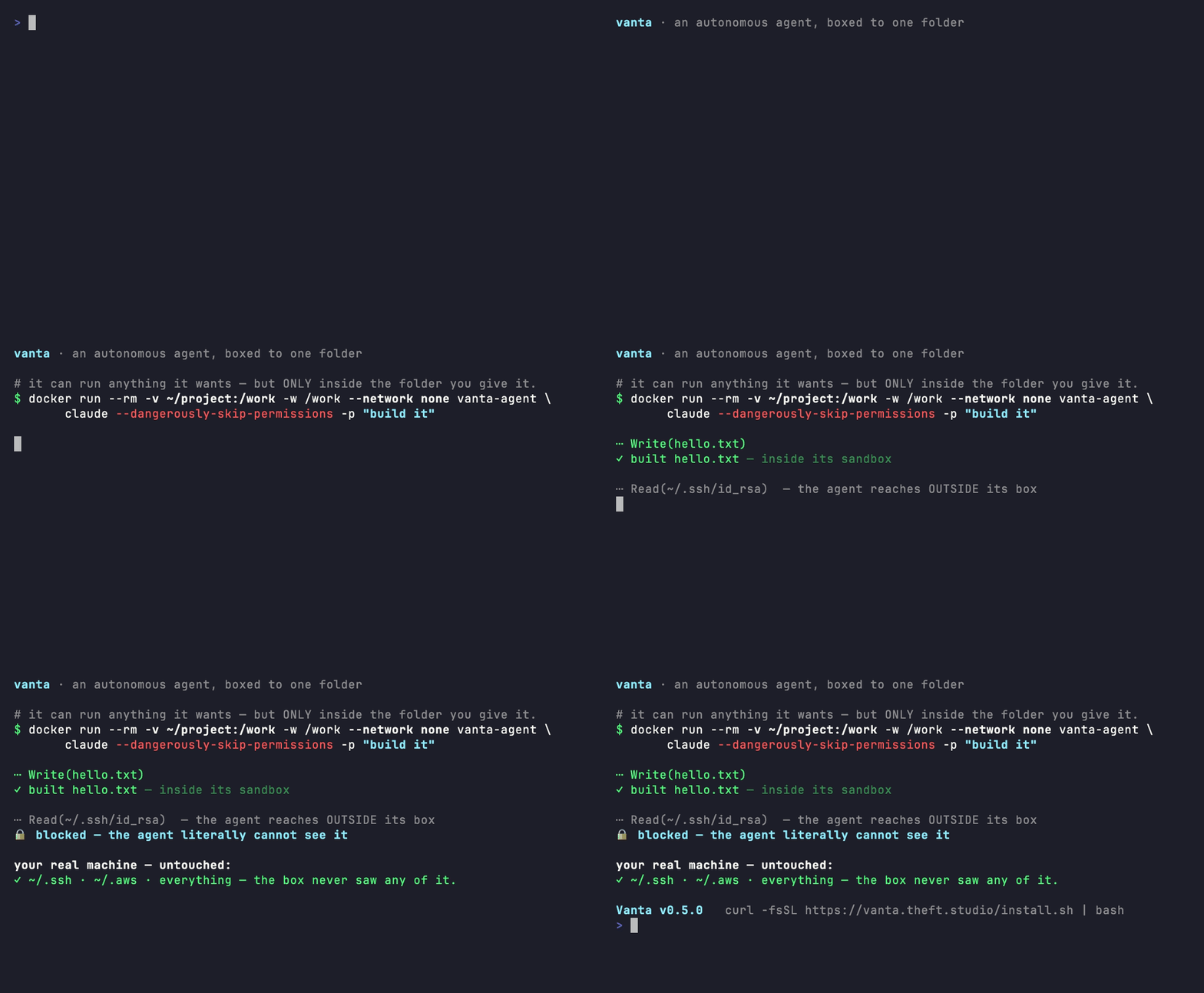
The thing enforcing control must not be the thing being controlled. vanta-kernel owns risk classification, approvals, goal state, and audit events. The TypeScript agent proposes an action but cannot execute it directly. The kernel decides. A jailbroken prompt still hits code it cannot talk past.
Autonomy became three explicit states, not a slider.
Safe work proceeds. Consequential work asks. Blocked work stays blocked. A single trust slider forces a bad trade between useful and safe. Vanta classifies every proposed action instead. Low-risk work runs. Consequential work stops for approval. Out-of-scope work is refused. A blocked action cannot be clicked through.
Local-first, provider-agnostic, and open to audit.
A boundary you cannot inspect is not a boundary you can trust. Vanta runs on your machine with tools connected through MCP. It can use different model providers, and the source is MIT. Anyone running it can inspect the kernel that gates the agent. The installer ships checksum-verified kernels for macOS, Linux, Android, and Windows.
Map the work before showing the finish.
The information architecture, user tasks, screen inventory, connected wireflow, individual frames, and implementation boundary are kept in one sequence.
Vanta sitemap
- Vanta Desktop
- WorkPrimary operating surface
- Sessions
- Conversation
- Active run
- Approval queue
- Attached context
- OutputsEvidence and reuse
- Artifacts
- Previews
- Changed files
- Receipts
- Run history
- ConnectCapability setup
- Providers
- Tools and skills
- MCP servers
- Messaging
- Setup status
- Utilities
- Inspector
- Command palette
- Settings
- WorkPrimary operating surface
3 complete paths, including recovery
Start or resume work
Start or resume a task without losing its prior context.
- 01Operator
Open Vanta
- 02Desktop
Show recent sessions and a new-task prompt
- 03Operator
Resume a session or describe a new task
- 04Agent
Prepare the run with goal, context, model, and tools
- 05Desktop
Stream text, tool events, and current state
- 06Operator
Review the result and receipt
If setup is incomplete, Vanta keeps the draft task and routes to the missing provider or capability, then returns to the same session.
Approve a consequential action
Stop risky work before it runs and show exactly what is waiting.
- 01Agent
Propose a tool action
- 02Kernel
Classify the action as allow, ask, or block
- 03Desktop
Show target, scope, and available evidence
- 04Operator
Allow once or reject
- 05Kernel
Execute or refuse, then record the result
- 06Desktop
Return the run to an explicit state
A rejection does not end the session. The agent receives the refusal, revises the plan, and any new action is classified again.
Recover and reuse output
Keep incomplete work and check every permission again before replay.
- 01Desktop
Detect an interrupted or failed run
- 02Desktop
Mark provenance as incomplete and keep prior events
- 03Operator
Inspect the receipt and choose resume, fork, or stop
- 04Agent
Rebuild context from saved state
- 05Kernel
Reclassify every proposed action
- 06Operator
Review the recovered output
If the original tool or provider is unavailable, Vanta keeps the evidence and offers a new branch instead of presenting a partial replay as complete.
Screens, purposes, and routes
Operate
Start a task or resume a session.
Show the goal, streaming response, tool activity, and stop control.
Hold a consequential action before execution.
Inspect
Review an artifact, preview, changed file, or diff.
Trace the goal, tools, approvals, outputs, and final state.
Explain interruption, preserve provenance, and offer a safe next action.
Configure
Configure providers, tools, skills, servers, and channels.
Choose a saved default or a model for one task.
Manage standing preferences without crowding the work surface.
One work loop, with visible branches for setup, approval, output, and recovery.
Each box is a screen or state. The return paths keep the session intact and bring the operator back to Work.
- readyWork home
- choose modelModel selection
- start taskActive run
End state
- returnWork home
- kernel asksApproval request
- resultOutput detail
- interruptedRecovery
- allow or rejectActive run
- resume or forkActive run
- replay or forkActive run
- traceRun receipt
Structure and state before visual finish
Shared application shell
The shell stays stable while the task state changes inside it.
empty / active / approval / output open / recovery
Work home
Recent sessions, one task entry, and capability status.
empty / ready / setup needed
Active run
The run stays legible while text and tool events stream.
planning / streaming / approval / failed / complete
Approval request
The action, target, scope, and evidence appear before the decision.
waiting / allowed / rejected / stale
Output detail
One output with preview, source run, and reuse actions.
loading / ready / missing
Connect
Capability setup is grouped by what the operator is trying to enable.
ready / needs setup / unavailable
Recovery
Incomplete provenance is visible before resume, fork, or stop.
interrupted / provider unavailable / tool failed
The desktop observes the run. The kernel decides what may execute.
This comes from the current repository. The layers separate what the interface shows, what the agent proposes, and what the kernel allows to run.
- Operator states a goal
- Agent prepares context and proposes an action
- Safety client sends the action to the kernel
- Kernel returns allow, ask, or block
- Allowed work executes, asked work waits, blocked work stops
- Events, outputs, and receipts return to the desktop
The boundary, on screen.
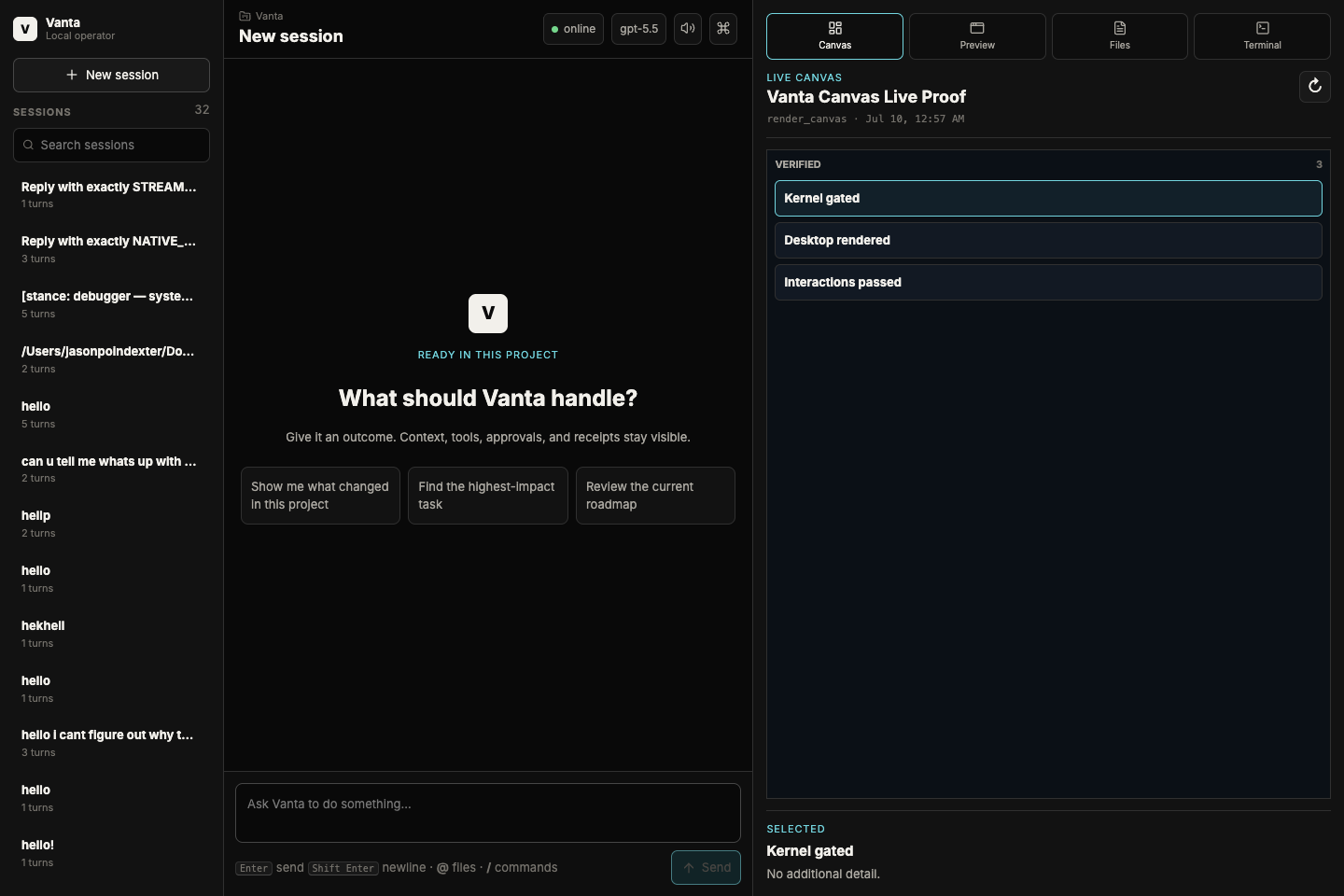
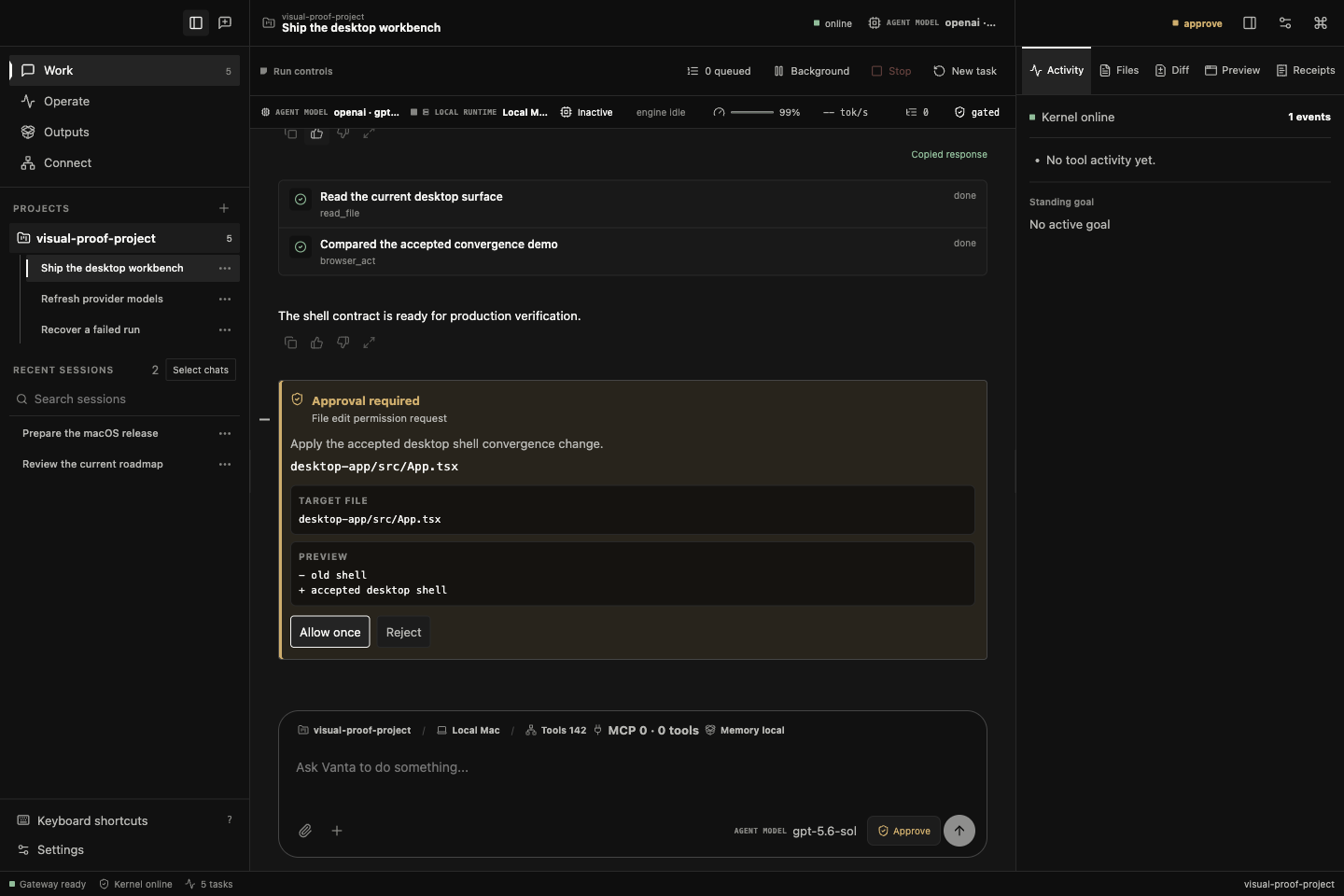
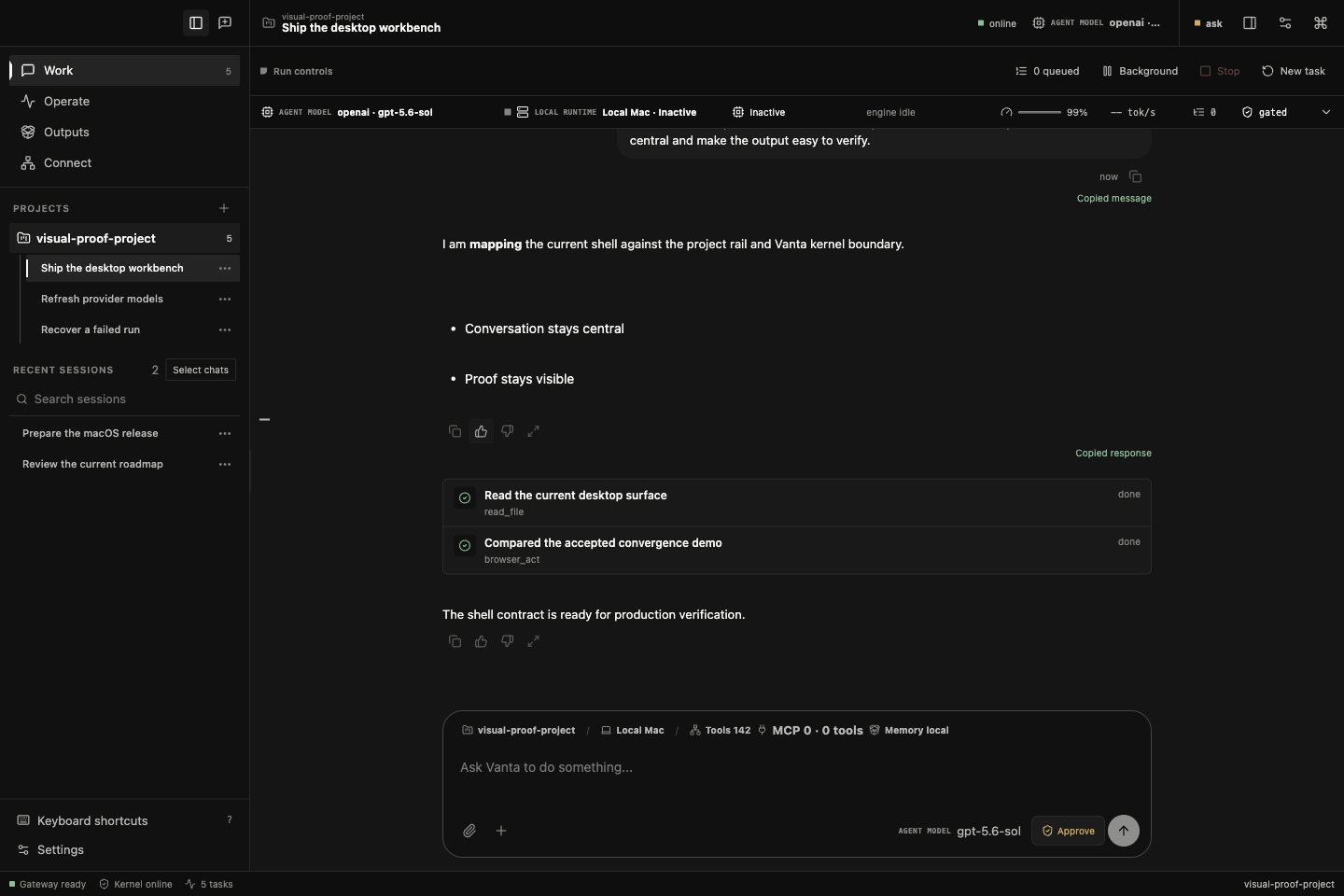
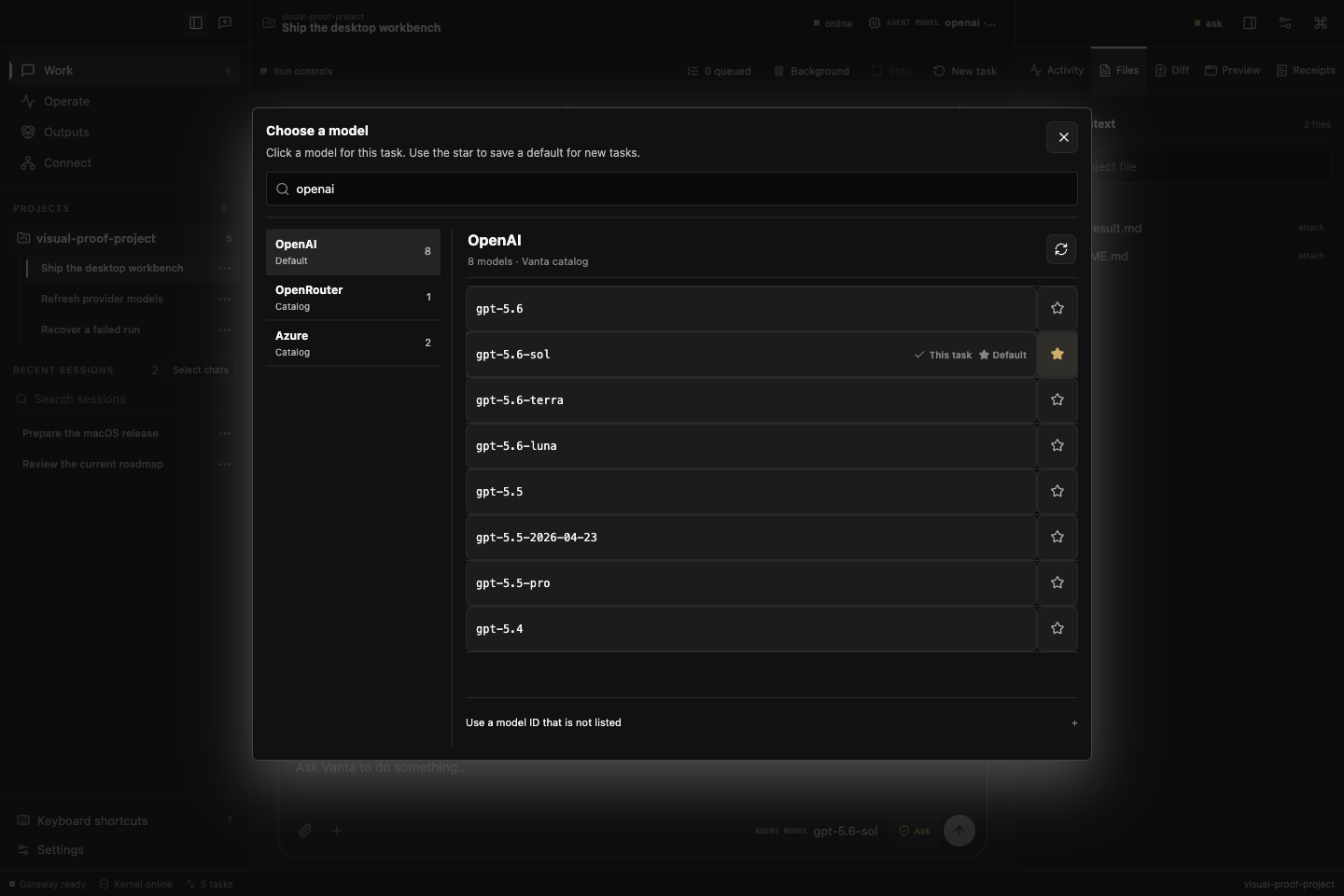
Vanta ships as a macOS desktop app. The kernel state stays visible. Tool calls and approvals appear in the work stream. The output rail opens only when there is a file, preview, or receipt to inspect. A consequential action stops the run until a person answers.
| Surface | What it carries |
|---|---|
| Work | Chat, live tool activity, run receipts, files, model scope, approvals, recovery |
| Sight | Capture a macOS area, window, or all displays into removable task context |
| Connect | Setup state for providers, skills, MCP servers, messaging, Google services |
| Models | Live catalog with a default and a one-task model selection |
| Outputs | Generated files, previews, diffs, receipts, and other run artifacts |
What the operator can always see, stop, and undo.
A person needs to see the boundary working and step in when something is wrong. Vanta shows the current goal, tool calls, approval state, outputs, and run record in the work surface.
| Question | How Vanta answers it |
|---|---|
| What is it doing right now? | Live tool activity in Work; each call named and checked off as it completes |
| Is the boundary up? | Kernel online and gated read in the chrome, not buried in settings |
| What is it working toward? | Standing goal in the right rail, backed by the kernel goal ledger |
| When does it stop for me? | Consequential actions halt the run in the approval queue before execution |
| What are my choices? | Allow once or Reject; standing access is a separate deliberate setting |
| How do I stop a runaway? | Stop control, plus a per-turn tool-budget circuit breaker that yields control |
| What happened? | Run receipts, diffs, outputs, and an audit event log per run |
Recovery is re-gated, not replayed on trust.
A saved run can be inspected, forked, or replayed. Replay never reuses an old approval. Every action passes through the current kernel and asks again when required. After a restart, interrupted work returns as incomplete instead of pretending the run finished cleanly.
I audited the desktop against sixteen frameworks.
I designed the supervision model, which makes me a bad person to judge it alone. I ran a blind audit and a separate user-flow review that looked for failure instead of trying to confirm the design.
What I verified for the current release.
The v0.9.8 release records 1,473 TypeScript test files and 13,687 passing tests, with 3 intentional skips. It also records typecheck, a production desktop build, architecture tests, and an Electron layout and replay smoke. The smoke used fixture data, not a live paid provider. v0.9.8 does not claim a new notarized DMG. v0.9.5 is the notarized and stapled Apple Silicon build.
| Claim | Status |
|---|---|
| Kernel gates actions across three states | Executed, shipped in Desktop v0.9.5 |
| 13,687 tests passing, 3 intentional skips | Executed, recorded in the v0.9.8 release |
| Signed, notarized, stapled macOS build | Executed, v0.9.5 DMG |
| Replay re-gates through the current kernel | Executed, v0.9.8 fix |
| Path canonicalized before assessment | Executed, v0.9.7 fix after approval and sandbox scope disagreed |
| Resistance to a determined adversary | Not claimed. No external audit or red-team result exists yet |
| Adoption or usage outcomes | Not claimed. No telemetry; the product does not track users |
Observe. Interface. Execute.
The raven watches before it acts. That made it the right mark for Vanta. The palette uses three colors. An editorial serif carries the argument and mono carries system state, so the person and the machine never sound the same.
- 01 Observe
- 02 Interface
- 03 Execute


See it live.
The website uses the same visual system as the desktop app. The docs explain the boundary to a person. The kernel enforces it for the machine.
I designed the operator and built its safety boundary.
I wrote the mandate, designed the brand and interface, built the Rust and TypeScript architecture, and shipped the Electron app to a notarized release.
The controls are shipped, and the release records the tests and builds above. That is not adversarial proof. Vanta has no external security audit or red-team result, and I do not claim it can stop a determined attacker. The product does not track users, so there is no adoption data. The two-layer architecture, enforced gate, notarized macOS build, and MIT source are available to inspect.